Skip to content
Zentis AI
Request a demo
Zentis AI
Industries
Banking & creditSOUL co-pilot, retail credit, onboarding.InsuranceFNOL, claims triage, underwriting.Finance, risk & voiceForecasting, reserving, voice agents.Insurance BrokerageEvery quote and every renewal, ready before the client starts wondering.
Products
Zentis AnalyticsForecasting, reserving, and regulatory reportingAuditOSBank, e-commerce, Shariah, and claims audit.FAMIend-to-end motor insurance automationZentis BinderDefence file assembly, live as the case runs.
Resources
NewsProduct news and conference write-ups.ArticlesLonger pieces on AI in regulated industry.Events & webinarsWhere to find us in person.UsecasesA library of reusable, editable templates.
Company
AboutWho we are and why the harness is the product.PartnersTechnology, consulting, and reseller partners.ContactTalk to the team, or book a working session.CareersJoin us
Platform
ZaraZara is where a workflow starts, Zara builds the team.Zen StudioZen Studiois where engineering opens it upZen PilotZen Pilot is where it actually runs
Request a demo

Stay Ahead with Zentis AI Insights

Subscribe to receive the latest updates straight to your inbox

Zentis AI

An enterprise-grade agentic platform for banking, insurance, and audit. Incubated by Techvantage.ai.

Platform

ZaraSPARZen StudioZen Pilot

Solutions

Audit & complianceInsuranceBanking & creditFinance, risk & voice

Trust

The defence fileSecurityAssuranceRegulatory packs

Resources

NewsArticlesEvents & webinarsClassic

Company

AboutPartnersContactCareers
© 2026 Zentis AI. All rights reserved.info@zentis.aiLondon, England
Anthropic Partner NetworkNVIDIA InceptionTechvantage.ai, Deloitte Technology Fast 50

Describe the process. Zara builds the team.

Most tools hand you a blank canvas and call it flexibility. Zara asks what a good consultant asks, reads the SOP you already have, and hands back a working team before the meeting would have ended.

Where Zara fits

Zara is where a workflow starts, but it's one piece of a runtime built from three connected surfaces. Zara builds the team. Zen Studio is where engineering opens it up, sets exactly how far it's allowed to go, and chooses where it runs. Zen Pilot is where it actually runs, and where every decision gets explained in a sentence you can read. All three run the same governed cycle underneath.

You say what you need. She builds it in front of you.

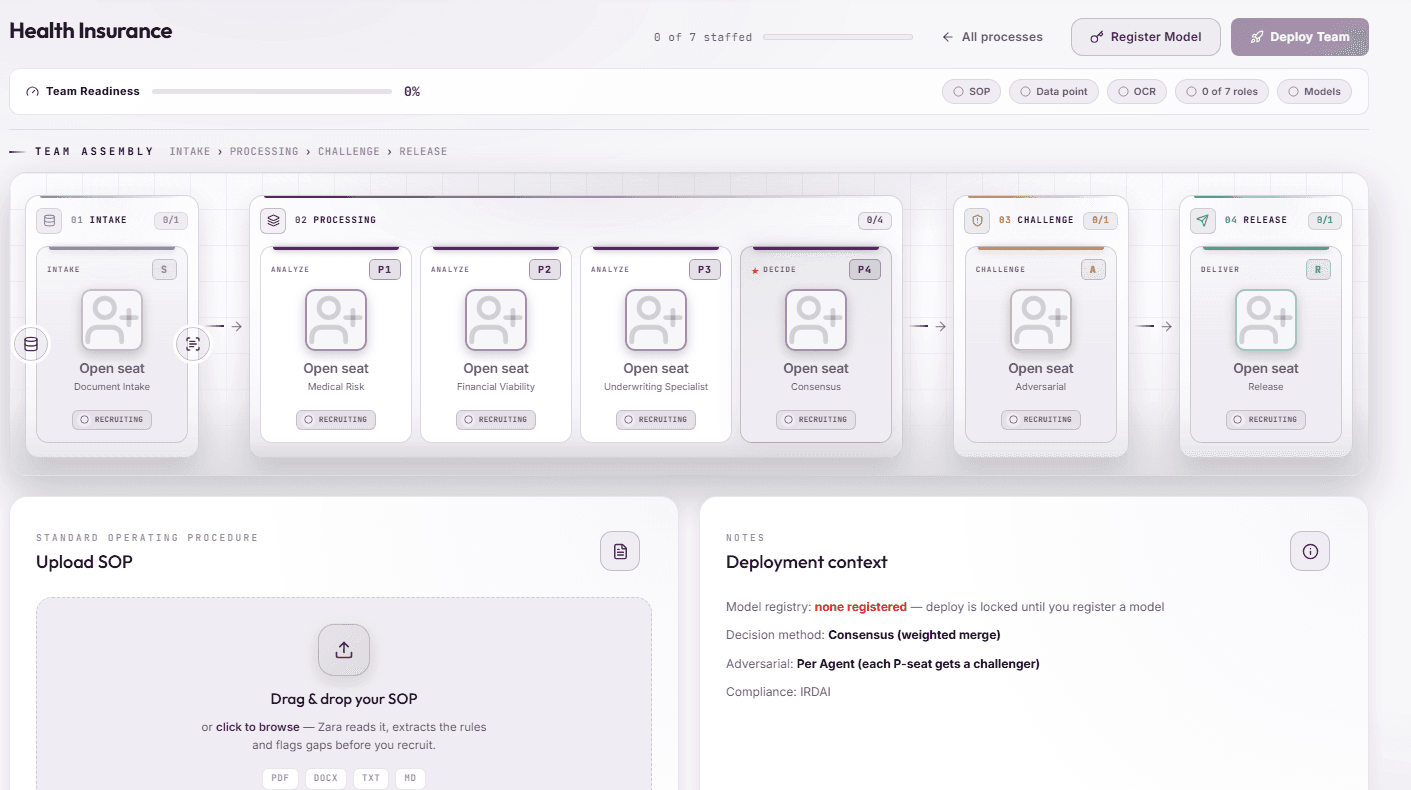
No template library to search through. No empty grid waiting for you to know what an agent architecture is supposed to look like. You type the job, and Zara starts filling seats.

Image, full builder canvas
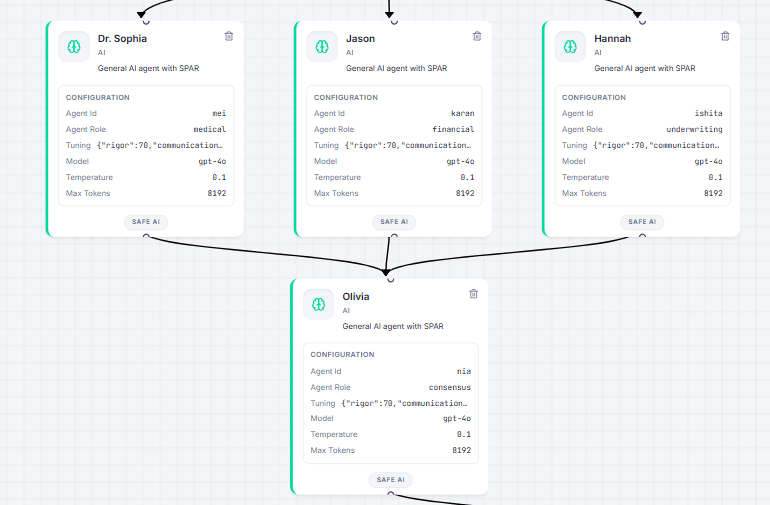
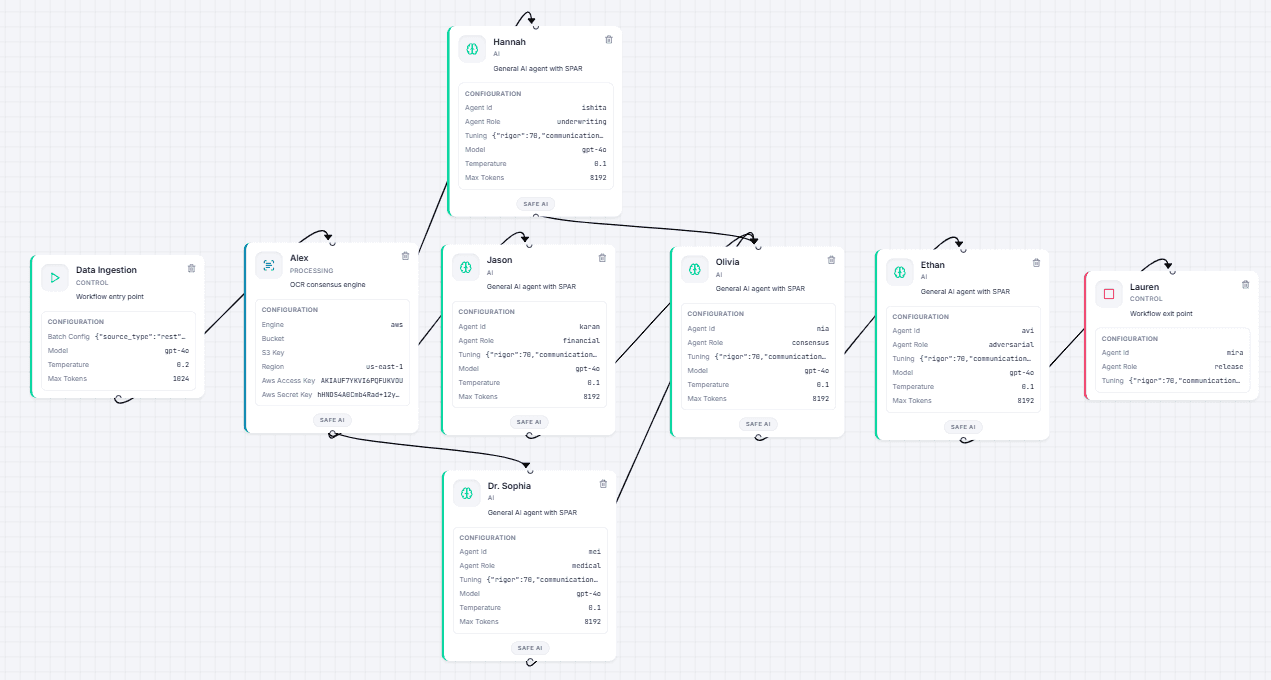
Type "health insurance underwriter" and within the same conversation, Zara has already picked a Source agent to ingest applications, four Process specialists split across medical, financial, and underwriting review, a Consensus layer to catch disagreement, an Adversarial agent, and a Release agent to hold the gate. You're not configuring a workflow. You're watching one get proposed, argued for, and slotted into place in real time.

She tells you why, not just what

Every pick comes with a reason, written out where you can see it, not buried in a changelog you'll never open.

Zara, panel architect
Dr. Neha is in. Solid choice, she assesses medical history, lab reports, and lifestyle factors.
Mira is in. Good pick for an alternate, multi-jurisdiction releases and reinsurance cessions.
Panel is complete. Make it operational when you're ready.

That's the difference between a system that assembles agents and one that argues for them. If Dr. Neha's rationale doesn't match the case in front of you, you push back before the panel deploys, not three weeks into production when something's already gone sideways.

No seat is a single point of failure

Every role on the panel comes with at least one alternate, already vetted, already labelled with what makes them different.

Primary

Dr. Neha

Assesses medical history, lab reports, and lifestyle factors for the standard case.

Alternate

Dr. Mei

Specialist in metabolic and cross-condition cases, the ones the standard reviewer would flag and pass along.

Swap the seat, not the workflow. A source agent built for high volume document intake sits behind Sia by default, with Ren, tuned for exactly that kind of throughput, ready to take over the moment volume spikes past what a single agent should carry alone.

Open any seat, and the configuration is real

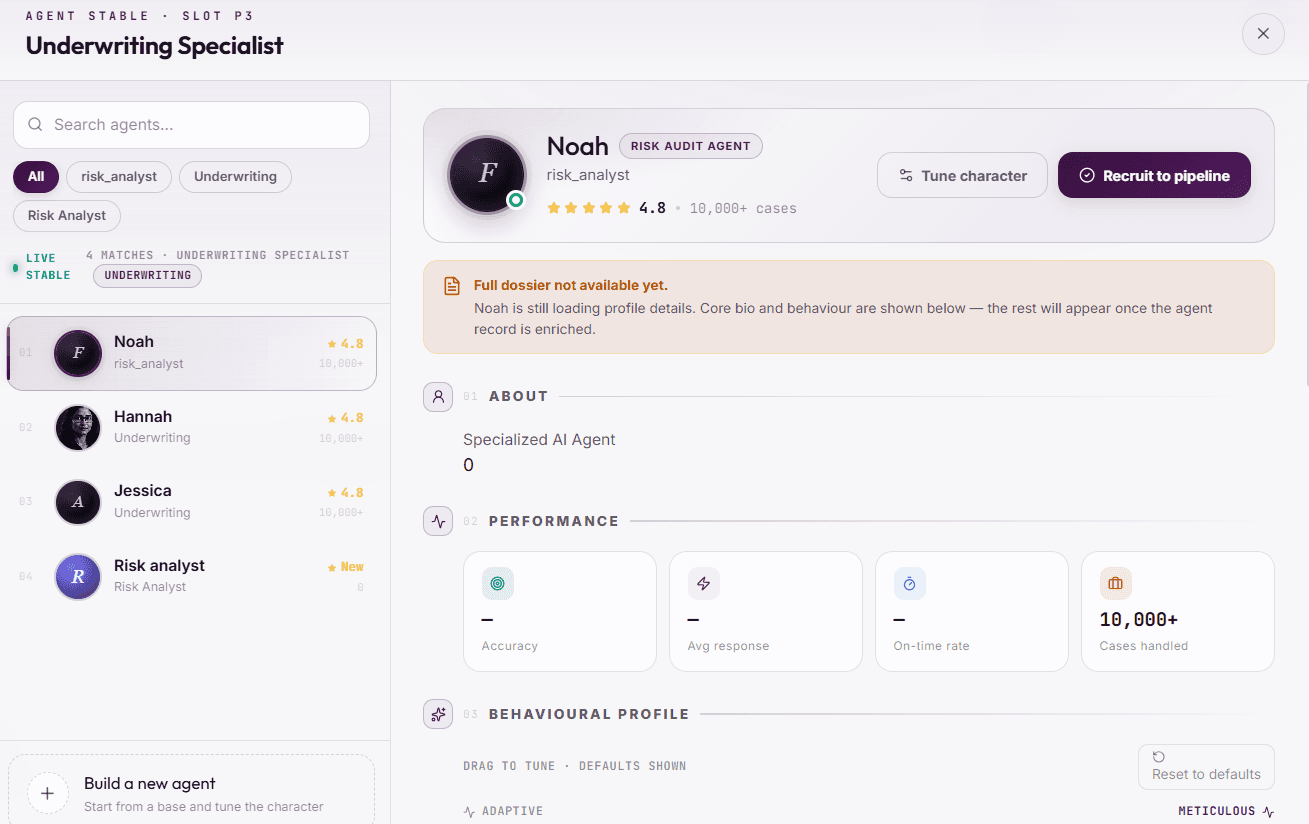
Not a black box with a name attached. An Operating Brief in plain text, an engine choice with the dials exposed, and the domain parameters that make the difference between a generic underwriter and one that actually knows UAE rules from Saudi ones.

Image, agent configuration panel
0.2temperature, set per agent, not platform wide
UAEa jurisdiction parameter, not a hardcoded assumption
1024token budget, visible and adjustable

The shape of the team, before you commit to it

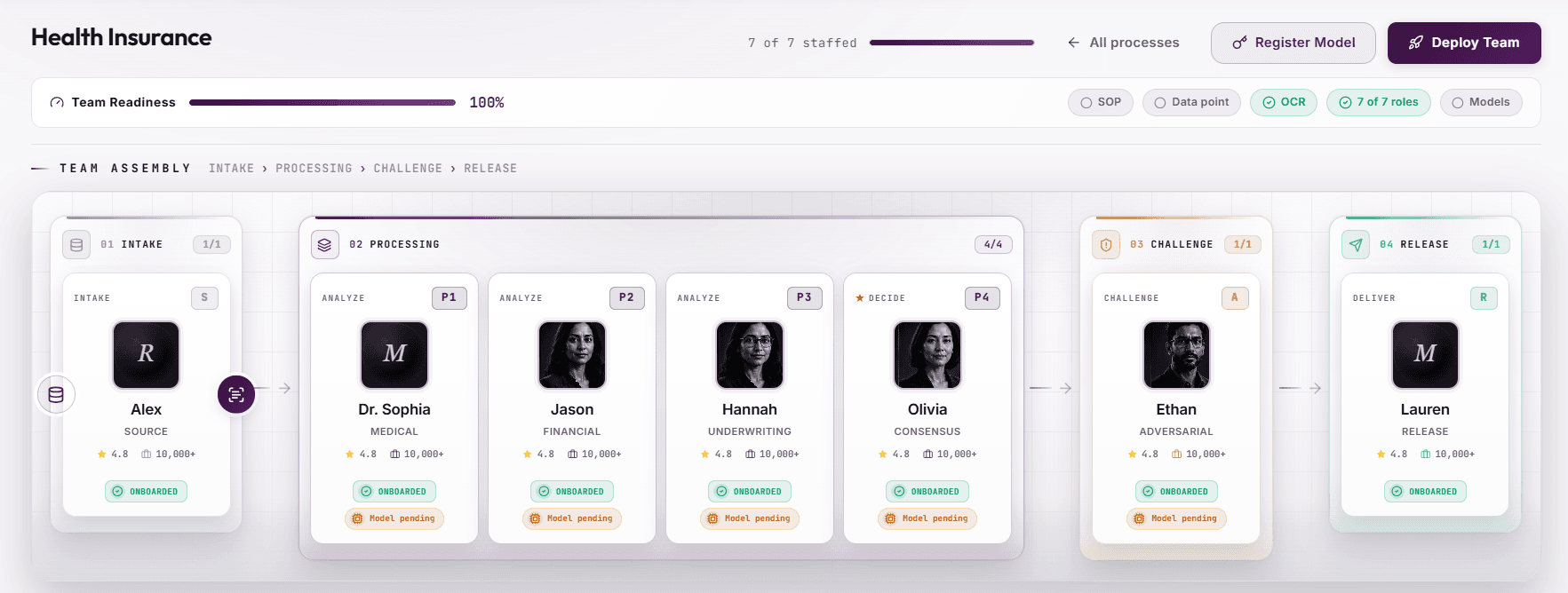
A dependency graph most platforms only show you after something's broken. Zara shows it to you before you press deploy.

Image, Team Map

You can trace exactly what happens between the application landing and the decision leaving. Not because someone documented it after the fact, but because that's what the map already shows, before a single case has run through it.

The conversation is with the process owner, not the developer

Not engineering

Talks to whoever runs the process

The underwriter, the claims lead, the compliance officer. Not a developer translating their requirements secondhand.

Before build

Catches the SOP arguing with itself

Reads the document you hand over and flags where two sections quietly contradict each other, before either becomes an agent's instructions.

Live

Cost and time, before you commit

An estimate while you're still deciding, not an invoice after the fact.

Common questions about Zara

Do I need to know how to write prompts?

No. Zara asks the questions a consultant would ask, in plain language. You answer, she drafts.

What if I don't have a written SOP?

Zara can start from a description of the process. A written SOP just gives her more to check for contradictions before anything gets built.

Can I change the team after Zara builds it?

Yes. That's exactly what Zen Studio is for, opening the draft, adjusting the guardrails, and versioning it before it goes live.

Once the team is drafted, here's where it goes next.

Next · Zen Studio

Open the build

Set guardrails node by node, browse the full 168-agent roster this team draws from, and choose where it runs, SaaS, private cloud, on-premise, or air-gapped.

Explore Zen Studio →
Then · Zen Pilot

Watch it run

Real-time execution, explainability down to the node, the control plane, and Silent Agents watching for work that shouldn't wait for a person to notice it.

Explore Zen Pilot →

Where the team gets its rules.

Zara drafts a team by talking. Zen Studio is where that draft becomes something engineering can actually stand behind: configured node by node, guarded on purpose, versioned like it matters.

If a team hasn't been drafted yet, that starts with Zara. Once it's here, this is where engineering opens it up. Once it's configured, it runs in Zen Pilot.

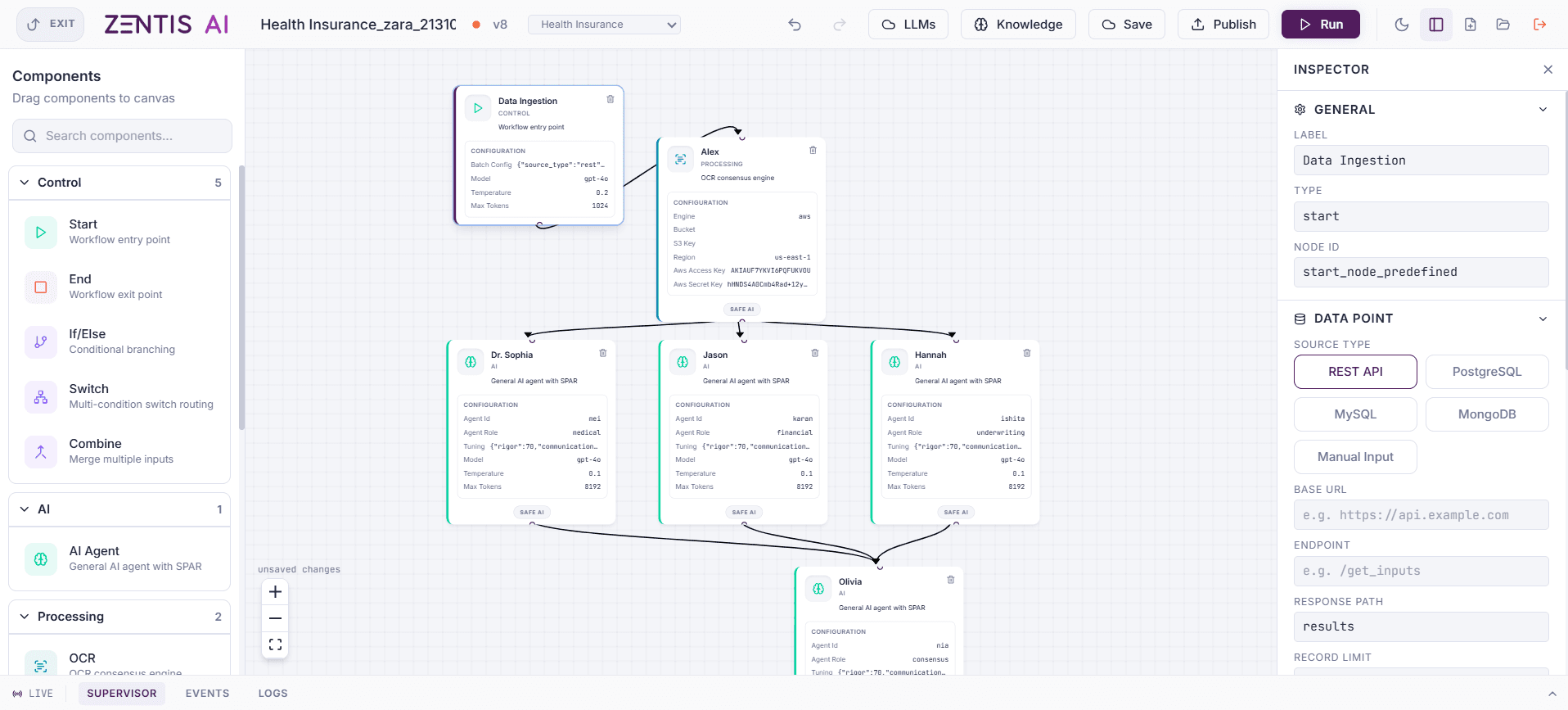
SPAR isn't a slide. It's the canvas itself

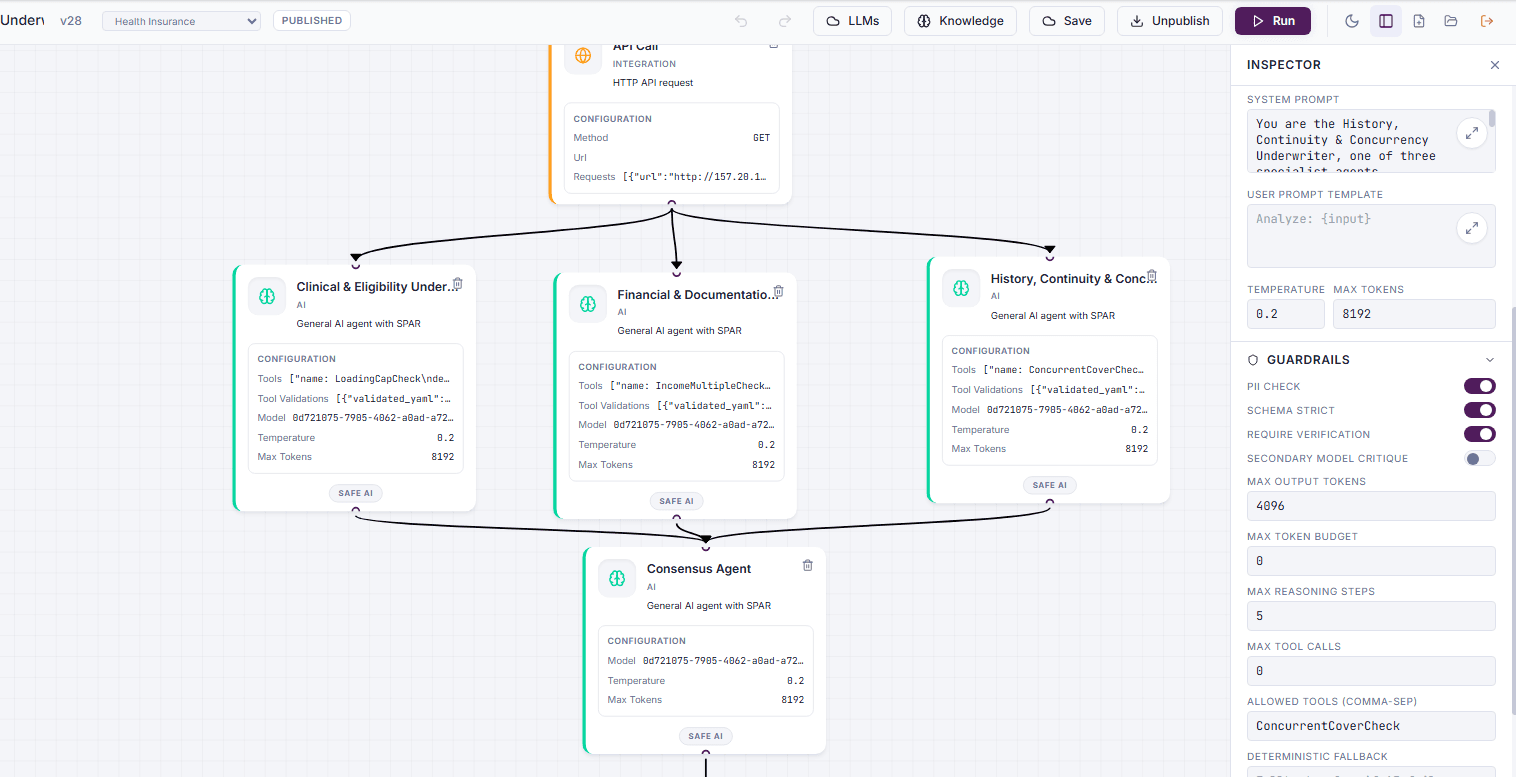
Every workflow you build runs the same four stages, enforced by the runtime, not a policy someone can quietly skip under deadline pressure.

Image, full workflow canvas
SSource: deterministic intake, hashed at ingest
PProcess: specialists reason in parallel
AAdversarial: a different model tries to break it
RRelease: a named human signs off
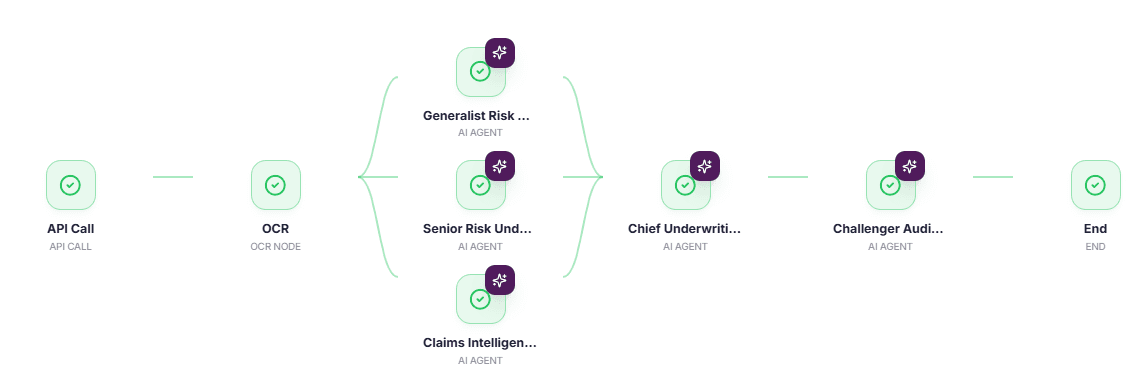
The canvas above runs Consolidation mode: three specialists work different parts of the same marine claim, merge into one record at the Chief Claims Officer node, and only then face the Adversarial Agent. Fastest path, lowest token cost, right for the volume of claims that don't need three independent opinions.

For the calls that do need three opinions

Consensus mode runs the same canvas differently: specialists answer independently, and where they land, together or apart, is itself the signal worth reading.

Image, Consensus mode example
Consolidation and Consensus aren't two products. They're the same runtime, the same guardrails, the same Adversarial stage, applied at different intensities depending on what the case in front of you is actually worth getting wrong.

Every node opens to real configuration

Not a prompt box with a friendly name. A full inspector: system prompt, temperature, token limits, and the guardrails that apply before anything downstream ever sees the output.

Image, node inspector panel
On by default

PII check, schema strict, require verification

Guardrails a node ships with, visible and toggleable per agent, not hidden three settings menus deep.

Named limits, not hopes

Reasoning steps, tool calls, allowed tools

An agent's ceiling is a number someone chose on purpose. A deterministic fallback covers what happens if it's ever reached.

The Stable: every agent this team can draw from

When Zara says "Dr. Neha is in," this is where Dr. Neha actually lives. 168 named agents, all mapping to six universal archetypes. Only the domain knowledge inside changes, which is why a new solution takes weeks, not months.

01

Intake

Opens the case, classifies what it's looking at, routes it to the right specialists. Claims Handler, Lead Auditor.

02

Domain Validator

Tests what's been found against the rules that actually apply. Policy Validator, Compliance Expert.

03

Evidence Intelligence

Pulls, hashes, and cross-references the documents everything else depends on. Evidence Collector, Doc Intelligence.

04

Adversarial

Tries to break the conclusion on purpose, from a different model than the one that reached it. The Skeptic, Fraud Investigator.

05

Synthesis

Turns everything upstream into the artefact a human actually files. Report Writer, Board Pack Generator.

06

HITL Gateway

Holds the gate. Nothing releases without a named human on record. Decision Officer, Approving Authority.

Deployment: where this actually runs

Same harness, wherever the data has to stay. Model choice is configuration, per agent, at runtime, not a decision you make once and live with.

Agent equals model plus harness. Only one half is yours.

Private cloud

Your cloud, your subscription

Runs in your AWS, Azure, or GCP tenancy. Data never leaves your boundary, KMS keys stay yours.

SaaS

Managed by Zentis

Multi-tenant or dedicated single-tenant. Instant start, zero infrastructure overhead for your operations team.

On-premise / air-gapped

Your data centre, offline models

Bare metal or OpenShift in your data centre, using self-hosted open-weights models. Zero external egress.

ArabicEnglishHindiMalayalamBahasa
RBIIRDAICBUAEFCA & Lloyd'sOJK

Versioned, published, and still yours to reproduce

v41this workflow's current published version
PUBLISHEDstatus, visible at a glance, not buried in a settings tab
Pinnedprompts and rule packs locked to the version that shipped

A run from March and a run from September should agree with each other if nothing about the case actually changed. That's not a promise you take on faith, it's what pinning the version, the prompts, and the rule pack together is built to guarantee.

Common questions about Zen Studio

Can non-engineers build workflows in Studio?

Yes. The canvas is visual and drag-and-drop. Process owners routinely adjust thresholds and persona sliders without writing code.

How do you prevent a rogue agent from looping forever?

Every node has explicit step and token caps. If reached, the runtime invokes the deterministic fallback and notifies the supervisor.

Can we bring our own fine-tuned models?

Yes. Model endpoints are configured per node. You can mix OpenAI, Anthropic, open-weights (Llama, Mistral), or custom internal endpoints in the same workflow.

The build starts before this, and runs after it.

Before · Zara

Start with a conversation

Describe the process, and get a first draft of the team back in the same session, before anyone opens Zen Studio.

Explore Zara →
Next · Zen Pilot

Watch it run

Real-time execution, node-level explainability, the control plane, and Silent Agents watching for work before anyone asks.

Explore Zen Pilot →

Where work runs, and where you can watch it running.

Real time execution observability. Every deployed workflow, every case moving through it right now, and every decision it made, down to the exact node that made it.

Every workflow running here was configured in Zen Studio, and started as a conversation with Zara. This is where it actually lives.

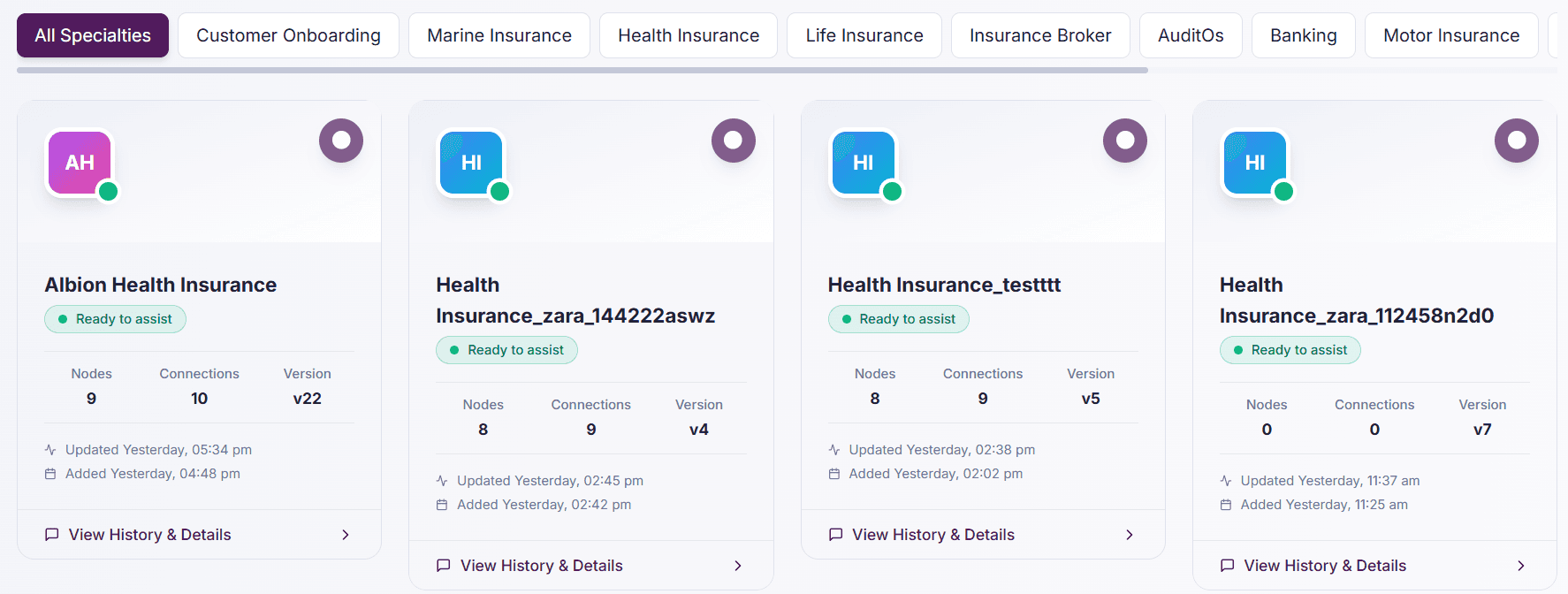
Every deployed workflow, at a glance

Filter by specialty. Check status, version, and when it last changed, without opening a single run.

Image, workflow dashboard
v162a workflow updated in June, still running the case it was built for
100%online and ready, shown per workflow, not assumed
Liveevery version timestamped: when it changed, when it was added

Every case, tracked while it's actually happening

Click into a workflow and the individual pipeline runs underneath it are right there, named, timed, and stepped through in real time, not reconstructed after the fact.

Image, execution pipeline view
Three named cases can be running at once, each with its own progress bar, its own duration, its own step count. One file doesn't wait behind another. They move through the same governed cycle in parallel, and both are visible the entire time.

Nobody can show the check stops being the objection the moment you can click a node and read exactly what it found.

Every decision, explained in language a person can actually read

Click any node in a completed run. The rationale is a sentence, not a log a specialist has to translate for the compliance team.

Image, AI Explainability panel
Plain language

A rationale a reviewer can actually read

Not a confidence score standing alone. A sentence explaining what was checked, what tool ran, and what it led to.

Underneath it

The numbers behind the sentence

Risk level, risk score, the exact node that produced the figure, and the inputs it used to get there, all on the same screen.

Most audit trails get reconstructed after someone asks for them, stitched together from logs nobody designed to be read by a person. Here, the record exists because it was built the moment each step ran, not because someone went looking for it three months later when a regulator finally called.

The control plane: always on, owned by nothing

The parts of the platform that stay separate from any single workflow, because governance a workflow could switch off isn't governance.

Watching

Supervisor agent

Monitors every running node for stalls, drift, and schema violations, and flags in real time.

Controlled

Kill switch

Controlled termination of a running workflow, so a runaway run costs seconds, not an afternoon.

Attributable

OpenTelemetry tracing

Every step traceable to the node, the model, and the agent that produced it.

One number

Risk Control Index

Covers guardrail coverage, escalation discipline, and evidence completeness in a single score.

Silent Agents: work that starts before anyone has to ask

Proactive triggers that sit above your systems of record. Event or threshold based, and governed by the same SPAR cycle as human-initiated work.

Webhook / Event

Event triggers

Starts the moment a core banking, claims, or CRM event fires. Zero polling lag.

Cron / Schedule

Schedule triggers

Runs recurring sweeps: daily sanction list diffs, weekly portfolio stress tests, monthly compliance reports.

Threshold

Drift triggers

Activates when an operational metric breaches tolerance (e.g. claim volume spike, fraud confidence dip).

Common questions about Zen Pilot

Can regulators access Zen Pilot audit trails directly?

Yes. Read-only compliance auditor roles can export self-contained defence files containing model versions, prompt snapshots, and cryptographic proof of human sign-off.

What telemetry standards does Pilot support?

Full OpenTelemetry (OTel) compliance. Spans and metrics can be piped directly into Datadog, Dynatrace, Prometheus, or Grafana.

How fast does the kill switch take effect?

Instantly. The runtime halts downstream agent execution within 50ms, revokes active tool tokens, and commits the state up to the halt point.

Want to see how this got built, or build the next one?

Start over · Zara

Build a new team

Describe a different process and watch a new panel get assembled, with the same live reasoning, in the same session.

Explore Zara →
Go deeper · Zen Studio

Open the configuration

See the guardrails, the roster, and the deployment options behind any workflow running here.

Explore Zen Studio →